Seat Numbering#
Available schemes#
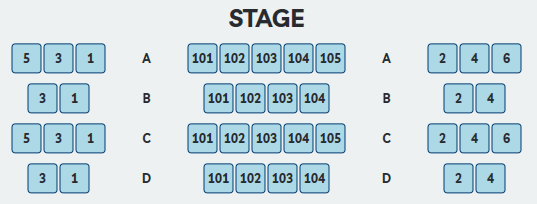
Odd-Sequential-Even (Broadway scheme)#
The most common scheme for North American performance venues. It assumes a combination of center-aligned and end-aligned row reference lines, typically representing three seating groups separated by aisles: a center section numbered sequentially, with side sections numbered odd and even respectively.
Settings include: - Starting number for each group (center, House Left end, House Right end) - Which side of the room is odd vs. even - Which end of each row the numbering begins from
Focus point position is critical for this scheme
For the application to correctly identify which end-aligned reference lines are on the House Left side, the focus point must be positioned toward the patron's right. The application looks for the end of the reference line closest to the focus point to determine orientation. An incorrectly positioned focus point will produce misnumbered seats.
Sequential#
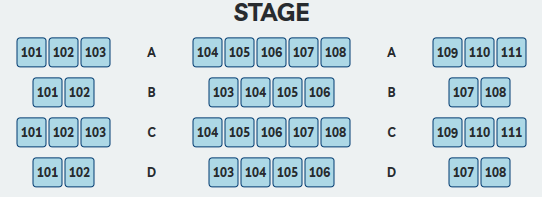
Provides sequential numbering across all rows from one side of the room to the other, grouping center, House Left end, and House Right end aligned rows together.
Note
If the center section has a Row A but the side sections begin at Row B, numbering may fall out of sync. Work with row groups that are consistently aligned, or place rows individually when alignment differs between sections.
The sequential scheme can begin from either the House Left or House Right side. A starting number can be preset.
Sequential Groups#
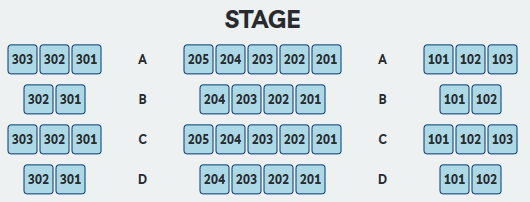
Similar to Odd-Sequential-Even, but each of the three groups (center, House Left end, House Right end) is numbered sequentially rather than odd/even. Each group can begin numbering from either end and can have its own starting seat number.
Manual#
Allows a manually entered starting number with a choice of sequential, odd, or even numbering. Selected in the Seat Properties pane at placement time.
Default values for manual numbering (starting numbers and direction) can be set in the Seat & Row Identifiers settings tab. A user can switch between the project's primary scheme and the manual scheme from within the Seat Properties pane. To change the primary scheme, use the Settings window.
Using seat numbers in Revit#
Seat numbers are stored in the shared parameter PB_Seat_Number on each seat family instance. They can be used in:
- Furniture or Multi-Category schedules
- Seat tags in plan and section views
- Visibility-controlled seat number annotations (see Seat Numbers)
Editing a seat number#
Individual seat numbers can be changed by editing the PB_Seat_Number parameter directly in the Revit Properties panel.
Warning
There is no automation associated with this change. The application does not validate or recalculate neighboring seats when a number is manually edited — it is the user's responsibility to ensure the result is correct and consistent with the rest of the row. For a clean, fully recalculated result, re-place the affected rows instead.