Selecting Settings#
Before placing seats, confirm the following settings are correct in the Seat Properties pane. Incorrect settings at this stage may require rows to be re-placed.
Open the pane using the Properties button in the Seat Placement panel if it is not already visible.
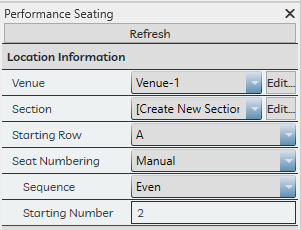
Location information#
Venue — Select the venue the seats are associated with.
Section — Choose whether to create a new section or add rows to an existing one. When adding to an existing section, the Starting Row will automatically increment to the next available designation.
Starting Row — Confirm the row designation for the first row being placed. Rows are processed from the reference line closest to the focus point to the farthest, and identifiers increment from this starting point. Note that except for Manual seat numbering, rows iterate in groups — Center Aligned, End Aligned House Left, and End Aligned House Right — all beginning from the same Starting Row designation.
Seat Numbering — Choose between the project's primary numbering scheme (set in Settings) or the Manual scheme.
Sequence (Manual numbering only) — Choose sequential, odd, or even numbering.
Starting Number (Manual numbering only) — Set the starting seat number for the rows.
Seat families#
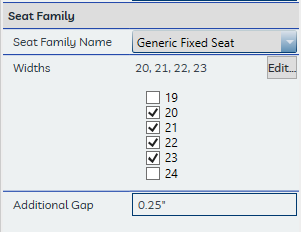
Seat Family Name — Select the seat family to use. Only one family may be used per placement operation.
Widths — Click Edit... to select which seat widths (types) to include in the layout. As a general rule, type names correspond to nominal seat widths.
Additional Gap — Adds a uniform gap between seats beyond the standard family width. Enter the value in inches (imperial) or millimeters (metric). The gap is applied to each seat instance at placement and is not retroactively updated if changed later.
Row layouts#
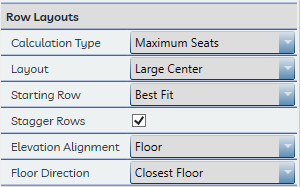
Calculation Type — Select the method used to determine seat size distribution. See Calculation Types.
Layout — Select the arrangement order for seat sizes within each row. See Seat Layout Order.
Starting Row — Choose even, odd, or best fit for the first row's seat count. See Row Staggering.
Stagger Rows — Whether subsequent rows alternate between even and odd seat counts.
Elevation Alignment — How seat elevations are determined. See Elevation Alignment.
Floor Direction — If Floor alignment is selected, sets whether the application looks up, down, or to the closest floor from each row reference line.
Focus point#
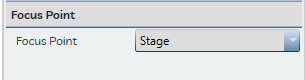
Focus Point — Select the focus point the seated rows should be oriented toward. This must be set correctly before placement — it cannot be changed after seats are placed.