Focus Points#
What they are#
A Focus Point is a Generic Model family with a visual sphere whose size is controlled by a diameter parameter. It is placed at or near the performance or presentation area and serves several purposes:
- Establishes the orientation of each row (which end is House Left vs. House Right)
- Provides a reference for sightline visualization
- Identifies which seats are looking toward which performance area in multi-stage venues
A focus point must be placed in the model before seats can be inserted. Any number of focus points may be used in a single model. Each focus point is assigned to a venue, and each row can only be associated with one focus point.
Placement#
Focus points can be placed using the Focus Point split button in the Tools panel on the ribbon. The dropdown offers 8 color options: Blue, Cyan, Green, Magenta, Orange, Red, Violet, and Yellow.
Colors are for visual reference only and have no effect on calculations. Multiple focus points may share the same color.
A focus point should be placed at the performance or presentation area, ideally toward the center of the rows it will serve. After placement, it is automatically added to the Focus Point dropdown in the Seat Properties pane and becomes the active selection for subsequent placements.
Focus points may also be placed using standard Revit family insertion techniques if the Performance Seating ribbon tool is not used.
See Placing a Focus Point for step-by-step instructions.
Naming#
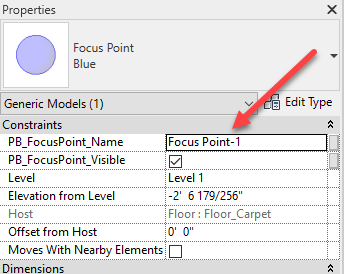
Focus points must be uniquely named. Names increment automatically based on the naming
convention set in Project Defaults. To rename a focus
point, change the PB_FocusPoint_Name instance parameter in the Revit Properties panel.
Warning
Attempting to rename a focus point to match an existing focus point name will produce an error.
Using a focus point#
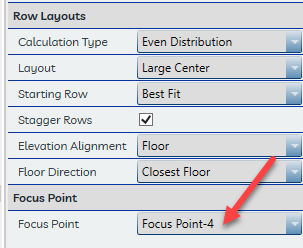
The Seat Properties pane shows which focus point is currently active. Select the appropriate focus point from the dropdown before initiating the Place Seats command. The focus point cannot be changed for a row after seats have been placed.
Deleting focus points#
Danger
A focus point that has been deleted cannot be recreated with the same association. Any seats or rows that referenced the deleted focus point will lose their editing capability and will need to be re-placed with a new focus point assigned.
There is nothing in Revit that prevents deletion of a focus point. Use caution when deleting focus points that are referenced by existing rows.