Understanding Calculations#
The Seat Properties pane includes a Row Layouts section with four calculation options that control how seats are distributed within each row:
| Setting | Controls |
|---|---|
| Calculation Type | How seat sizes are selected to fill the row |
| Row Staggering | Whether seat counts alternate between even and odd rows |
| Seat Layout Order | How seat sizes are arranged within a row |
| Elevation Alignment | How seat elevations are set relative to floors |
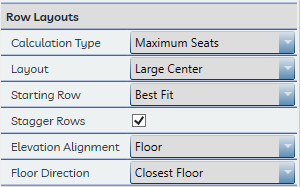
Each of these settings can be saved as user defaults in the Settings window.
Tip
These settings apply when seats are first placed using Place Seats. When using Replace Seats or Update Row, rows are recalculated based on options in those commands' own dialogs rather than the Properties pane settings.