User Defaults#
User defaults are stored on the user's machine and apply to all projects. They establish the default values used when placing seats, saving time on repetitive configuration across sessions.
Calculation defaults#
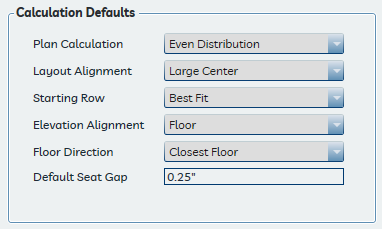
These settings match the calculation options available in the Seat Properties pane. Setting them here establishes the defaults applied to all future seat placements. Specific information about each option is in Understanding Calculations.
Miscellaneous settings#
Seat Standard Visible Side#
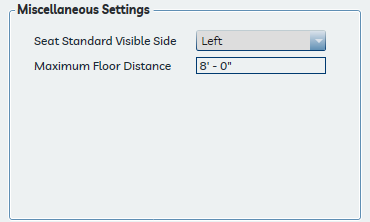
Determines whether the left or right standard in a seat family is visible for shared standards. This applies to the Generic Fixed Seat family and similar families that use shared armrest standards. The setting has no effect on seat calculations and is a matter of graphical preference.
Note
This setting applies only to newly placed seats. Seats already in the model are not affected when the setting is changed.
Maximum Floor Distance#
Sets the maximum distance the application will search up or down from a row reference line's host plane when looking for a floor or other approved reference element to use for seat elevation alignment.
This value is entered and displayed in the project's current units — feet and inches for imperial projects, millimeters for metric projects.
This setting may need adjustment when:
- Seats are not landing on risers in steep seating sections
- The vertical distance between reference planes and adjacent floors is unusually large
See Elevation Alignment for the accepted reference element categories.
Auto Update Location#
When enabled, editing the Venue, Section, or Row Identifier parameter on any seat in a row automatically updates the same parameters on every other seat in that row and synchronizes the row's internal data. This means a row identifier or section assignment can be corrected by editing a single seat — no need to touch each seat individually.
When disabled, parameter edits apply only to the individual seat being edited. The rest of the row is not affected and the row's internal data is not updated, which may cause inconsistencies in schedules and tags.
Auto Update Location is enabled by default and is the recommended setting for most workflows. See Editing a row identifier for more detail on how this works in practice.