Seats#
Overview#
Seat families are built with specific parameters that allow Performance Seating to perform calculations and place objects precisely. As a result, seat placement automation is supported only for families provided with the installation or specifically created by Performance BIM. Limited customization of provided families is supported — see Seat Customization below.
Available seat types#
Three primary seat families are included with the application:
Fixed Seats#
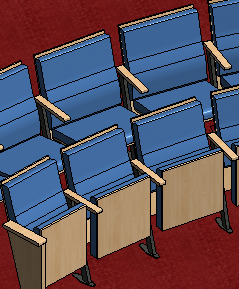
The Generic Fixed Seat is a floor-mounted fixed seat with shared armrest standards and end standards. Six seat widths are available, ranging from 19" to 24" in 1" increments. Seats are placed using shared standards between adjacent seats, with end standards at both ends of each row.
Removable Seats#
Removable, or "sled-based," seats are provided in single, double, and triple configurations, representing sections of fixed seats that can be removed by the end user. Individual seats include dedicated armrests; double and triple configurations share interior armrests. End standards are not provided for these groupings.
Portable Seats#
Portable seats are individual theatre-style stacking chairs, similar to those found in flexible theatres or conference facilities.
Additional seats#
Additional seat families will be made available as they are developed. Contact Performance BIM for information about seat families not currently included.
Seat widths and types#
The application uses Revit Family Types to provide varied seat widths. For ease of use in the Properties pane, types are named for their nominal widths.
Warning
Renaming types or adding types to a family is possible but may produce unexpected results and is not supported by Performance BIM.
Seat customization#
Due to the complexity of the parameters involved, using arbitrary custom seat families in the automation process is not supported. The following options are available for projects requiring customization:
Minor customization (supported with caveats)#
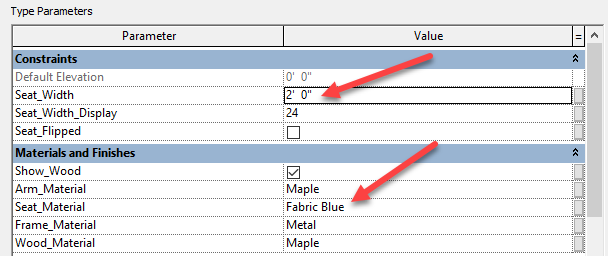
- Width adjustment: Changing the width of an existing family type, or adding a new
type, is possible provided the
Seat_Widthparameter is set correctly. Adjust theSeat_Width_Displayparameter as well to keep user feedback accurate. After changes, press Refresh in the Seat Properties pane to reload the family and type list. - Materials: Frame, Seat Bottom and Back, Alternate Wood Bottom and Back, and Arm materials may be replaced freely.
- 3D geometry: Minor changes to seat backs and pans can be made while remaining functional. Parameters are tightly coupled to standards for alignment on curved rows — significant geometry changes may break placement accuracy.
Note
Issues arising from seat customization are not supported by Performance BIM.
Seat replacement after placement#
Compatible families — To swap seat types within the supported family set after initial placement, use the Replace Seats command. This recalculates the row automatically and keeps it fully manageable by the application.
Non-compatible families — Seats can be manually replaced in Revit with families outside the supported set, for example to substitute a project-specific or manufacturer family for documentation purposes. This is permitted but carries significant limitations: the application will no longer be able to manage those seats, the row cannot be edited using Performance Seating tools, and support from Performance BIM for issues arising from non-compatible substitution is limited.
Custom seat families (Performance BIM-provided)#
Custom seat families tailored to specific project requirements can be created by Performance BIM. Contact support@performancebim.com for more information and pricing.