Configure Speaker#
Prepares a loudspeaker family for use with the application. Run once per family.
Using the tool#
Configure Speaker is in the Speaker System panel and is available in the Family Editor, not in a project.
- Open the loudspeaker family in the Family Editor.
- Click Configure Speaker.
- Answer the wizard's questions on how the family expresses aim.
- On the review step, click Configure. The parameters are added and the answers are recorded on the family.
- Save the family. Configure Speaker does not save it.
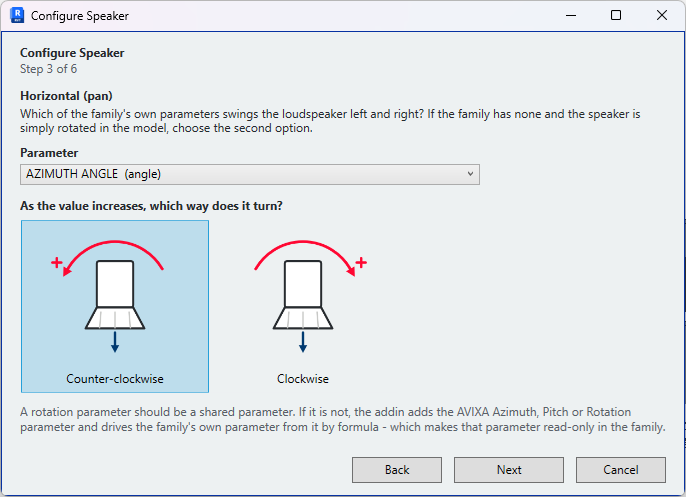
The wizard#
The wizard has six steps:
- Loudspeaker type — Omnidirectional, Array, Point source or Ceiling. The type is recorded on the family.
- Grille orientation — The direction the grille faces in plan with the family inserted unrotated.
- Horizontal (pan), 4. Vertical (tilt), 5. Rotation (roll) — The parameter that drives each axis, and the direction positive values turn. For the horizontal axis, a family without a pan parameter can be aimed by rotating the instance in the model instead. Direction can be confirmed by setting the parameter to a positive value in the family and observing the result.
- Review — The answers, before anything is written.
Manually configure, on the first step, answers every question on one screen, for a family whose behaviour is already known.
Face-based families — The wizard detects a face-based family and asks for the loudspeaker type only, then goes to the review. Grille orientation and aim parameters are not required: the family is aimed by its host surface.
AVIXA parameters — Where an axis is driven by a family parameter rather than a shared parameter, the wizard adds the AVIXA-standard parameter for that axis — Azimuth, Pitch or Rotation — and associates the family's own parameter with it by formula. The application then writes the AVIXA parameter and Revit drives the family parameter, which becomes read-only in the family. Using shared parameters for aim avoids this. The parameter group is set in Settings → Speakers.
Name collisions prevent the association
Where the family already contains a parameter named Azimuth, Pitch or Rotation that is not the AVIXA shared parameter of that name, the association fails. The wizard reports which parameter is responsible. Rename the family parameter and run Configure Speaker again. See Compatible families.
Verification#
The wizard checks the configuration before writing it to the family. Where it is incomplete or cannot be written, it lists the problems and writes nothing. On success it reports the number of parameters added.
Load the configured family into a project. It appears in the loudspeaker list when Sync Speakers is run.
Reconfiguring a family#
Run Configure Speaker again and answer every step. The wizard does not read the existing configuration; the new answers replace it. Save the family and reload it into the project afterwards.