Project Info#
Each venue's boundary, export destination and speaker file. Stored in the Revit model.
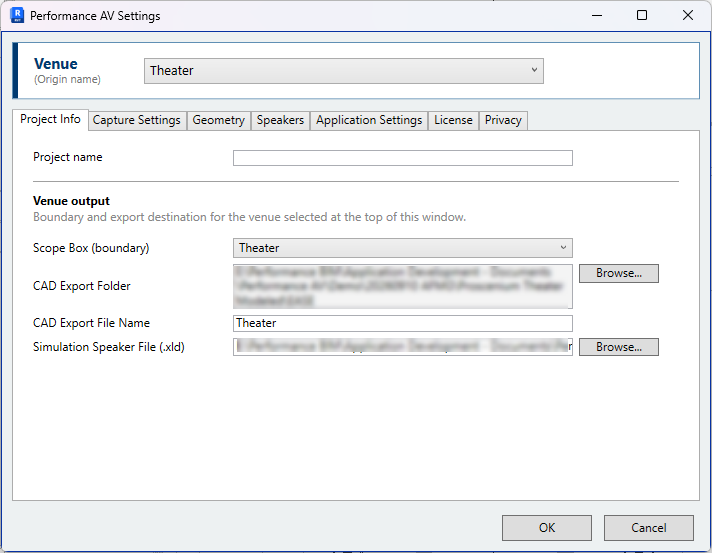
The venue selector#
The Venue list at the top of the Settings window applies to every tab. Each venue is a placed PAV-Origin, listed by its VENUE NAME parameter. Selecting a venue switches the per-venue settings on every tab to that venue.
A venue that cannot be captured is listed greyed, with the reason beneath it:
- the origin has no VENUE NAME;
- the origin is not inside any scope box;
- the PAV-Origin family in the model is out of date.
A venue that shares its name with another is flagged. It can still be captured, but both venues offer the same default export file name.
A venue is renamed by editing the VENUE NAME parameter of its origin in the Properties palette. Settings are held against the origin element, so renaming a venue does not affect its settings.
Venue output#
Scope Box (boundary) — The scope box that bounds the venue. Only scope boxes that contain the venue's origin are listed. The default is the smallest of them, which suits a nested box such as an orchestra pit inside a hall.
CAD Export Folder — The folder the venue's DWG is written to. Set it with
Browse; the field cannot be typed into. A venue with no folder of its own shows and
uses the Default CAD export folder from
Application Settings. Where that is blank, the DWG is
written to an AcousticExport folder beside the Revit model, or to
Documents\Performance AV Exports for a model that has not been saved.
CAD Export File Name — The name of the DWG, without the extension.
A warning is shown beneath these fields when the folder is on a drive or network location that is not available on this computer, or when two venues would write to the same file. In the second case the later capture replaces the earlier export.
Simulation Speaker File (.xld) — The .xld file that
Sync Speakers reads for this venue. Sync Speakers
sets it the first time it runs on a venue. A warning is shown when the file does not
exist or is not an .xld file.
The export folder and file name are also asked on the venue's first capture. See Capture the venue.