License#
Activation, trial state and updates. Available whether or not the application is licensed.
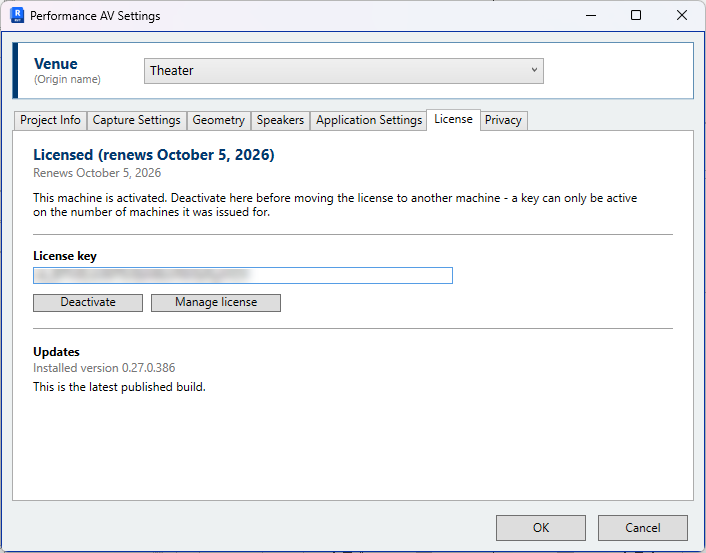
Trial#
A new installation runs a seven-day local trial with full functionality. The tab shows the licence status and the date the trial ends. To continue beyond that period, register for the free beta trial.
Register free trial — Opens the registration page in the browser. Registration creates the account, issues a trial licence and emails the key.
Activation#
License key — Enter the key issued on registration. The key is emailed when the account is created, and is also listed in the licence manager account under Licenses, reached from Manage license below.
Activate — Activates the licence on this machine. Activation requires an internet connection. The licence is checked again each time Revit starts. Where the licence server cannot be reached, the licence continues to work and the status reads offline; access is withdrawn only when the server is reached and rejects the key.
Deactivate — Releases this machine's seat so that the licence can be used elsewhere. The application stops working on this machine unless a trial is still running. Deactivate before rebuilding a workstation; otherwise the seat must be released by support.
Manage license — Opens the Freemius (licence manager) account page, showing the licence, its seats and invoices.
Updates#
The panel reports the installed version and whether a newer release has been published. Where one has, Download opens the download page and Release notes opens the notes for that release. Updates are not installed automatically.
Data transmitted on activation#
Activation and validation transmit the Windows user name and computer name, the operating system version, the system language and country, the application version and the licence key. This is required for licensing and cannot be disabled while the application is licensed.
It is separate from diagnostic reporting, which is optional and disabled by default. See Data and Privacy.