Speakers#
How Configure Speaker prepares a loudspeaker family, and how Sync Speakers mounts a face-based family. Stored per Windows user and applied to every model.
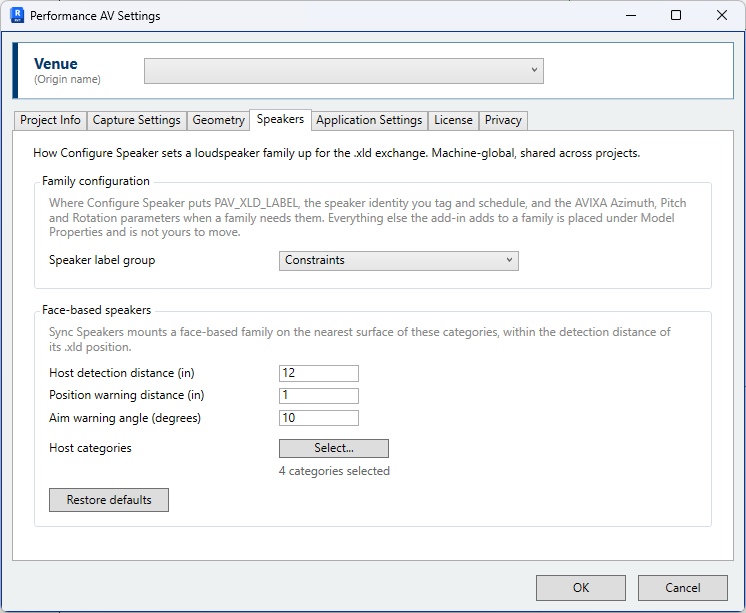
Speaker label group — The Revit parameter group that PAV_XLD_LABEL is added under
when a family is configured, together with the AVIXA Azimuth, Pitch and
Rotation parameters where a family requires them. The default is Constraints. The
alternatives are General, Construction, Dimensions, Text, Identity Data, Data and Model
Properties. The list shows Revit's own names for these groups.
PAV_XLD_LABEL is the loudspeaker identity used for tagging and scheduling, so its
position in the properties palette is set to suit the office template. All other
parameters the application adds to a family are placed under Model Properties.
The setting applies to families configured after it is changed. A family already configured retains its existing parameter placement.
Face-based speakers#
How Sync Speakers mounts a face-based family.
| Setting | Default | |
|---|---|---|
| Host detection distance | 12 in; 300 mm | Furthest distance from the .xld position at which a surface is used as the host. |
| Position warning distance | 1 in; 25 mm | A loudspeaker moved further than this onto its host is reported. |
| Aim warning angle (degrees) | 10 | A loudspeaker whose host orients it further than this from the .xld aim is reported. |
| Host categories | Walls, Floors, Ceilings, Generic Models | Categories whose surfaces may host a face-based loudspeaker. Select... offers the same categories as Capture Settings. |
Distances, and their defaults, are in inches for a project in imperial units and millimetres for a project in metric units. Restore defaults resets these four settings.
Configured families are not listed here
A family's aim map is held on the family itself, in the PAV_XLD_CONFIG type
parameter, and is written and read by
Configure Speaker.
Where a synchronised loudspeaker is aimed incorrectly, re-run Configure Speaker on the family and reverse the direction for the affected axis. See Sync Speakers.