Geometry#
The tuning values used by the capture algorithm. Stored per Windows user and applied to every model.
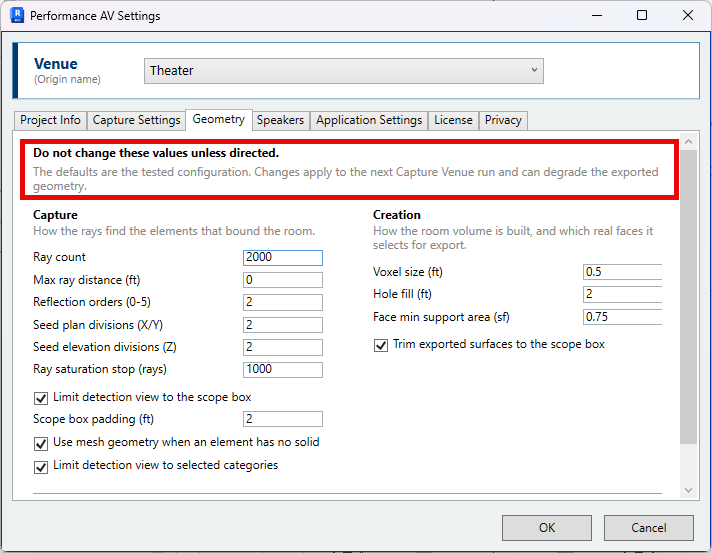
Tuning values#
As stated at the top of the tab:
The defaults are the tested configuration. Changes apply to the next Capture Venue run and can degrade the exported geometry.
These values were established by running captures against real buildings. They interact with one another, and no single combination is optimal for every room.
An incorrect capture is rarely resolved on this tab. The cause is usually the scope box, the origin, an unloaded link, or a category that is switched off. Work through Check the result first, and if the capture is still incorrect, report a problem. The run record identifies what the capture did.
Capture#
How the rays find the elements that bound the room.
| Setting | Default | |
|---|---|---|
| Ray count | 2000 | Rays cast from each seed point, spread over a sphere. |
| Max ray distance (ft) | 0 | Furthest distance at which a ray reports a hit. 0 is unlimited. |
| Reflection orders (0-5) | 2 | Bounces each ray makes, to reach surfaces not directly visible from a seed. |
| Seed plan divisions (X/Y) | 2 | Seed points along each plan axis of the room. |
| Seed elevation divisions (Z) | 2 | Seed levels through the room height. |
| Ray saturation stop (rays) | 1000 | Casting stops once this many rays in a row find no new element. 0 casts the full ray count. |
| Limit detection view to the scope box | On | Places a section box around the scope box, so elements wholly outside the room are not traced. |
| Scope box padding (ft) | 2 | Added to each side of that section box. Must exceed the thickest bounding wall, floor or roof. |
| Use mesh geometry when an element has no solid | On | Uses mesh geometry, such as imported CAD inside a family, for an element that has no solid. |
| Limit detection view to selected categories | On | Hides every category except the selected surface categories and Revit links in the detection view. |
Creation#
How the room volume is built, and which faces are selected for export.
| Setting | Default | |
|---|---|---|
| Voxel size (ft) | 0.5 | Grid resolution used to select the faces that bound the room. It does not coarsen the exported geometry. Capture time rises steeply as it is reduced. |
| Hole fill (ft) | 2 | Openings narrower than this are treated as closed. 0 disables it. |
| Face min support area (sf) | 0.75 | The room-boundary area a face must account for to be exported. |
| Trim exported surfaces to the scope box | On | Cuts exported faces at the scope box. |
Reset to Defaults — Restores the tested values on this tab, and the advanced values
held only in geometry.json. Nothing is written until OK is clicked.
Diagnostics#
The switches that retain a capture's geometry and views for review are on Application Settings → Diagnostics. See Check the result.